
Download LeapFTP – ftp, sftp, file transfer, file manager, secure transfer, file sharing, cloud, ftp client, sftp client, file transfer app, sftp file transfer
Overview
LeapFTP is a feature-rich mobile file transfer client tailored for users who require reliable, secure, and versatile connectivity across multiple file transfer protocols. Designed for both casual users and professionals, the app supports FTP, FXP, FTP+SSL, SSH/SFTP, and HTTP(S), enabling seamless file management across diverse server environments. Its primary purpose is to simplify the process of transferring files between local devices and remote servers, especially in scenarios where security, speed, and compatibility are critical.
The app addresses common pain points in remote file handling—such as complex navigation, lack of encryption, and limited protocol support—by offering a unified, tabbed interface that mimics a traditional file explorer. This layout enhances usability, allowing users to manage multiple server connections simultaneously without switching contexts. Real-world use cases include remote website maintenance, cloud backup coordination, and secure file sharing between teams or clients.
Developed by LeapFTP, the application has been available since 2010, indicating a long-standing presence in the productivity space. Although the developer did not provide additional technical details, the app’s continued availability suggests a stable and maintained platform. In the broader mobile app ecosystem, LeapFTP fills a niche for users who need a robust, protocol-agnostic file transfer solution on Android without relying on third-party cloud services.
Key Features & Functionality
- Multi-Protocol Support: LeapFTP integrates FTP, FXP, FTP+SSL, SSH/SFTP, and HTTP(S), giving users the flexibility to choose the optimal transfer method based on security, speed, or server compatibility needs.
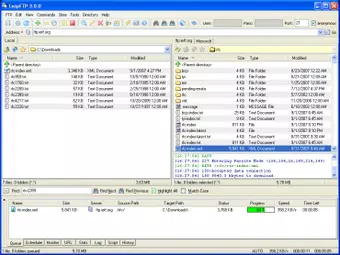
- Tabbed Interface: A user-friendly, Explorer-style layout with multiple tabs allows users to manage several server connections at once, improving workflow efficiency and reducing context switching.
- Advanced Security: The app uses industry-standard SSL and SSH libraries, encrypts site databases, and supports one-time passwords, ensuring that sensitive data remains protected during transit and storage.
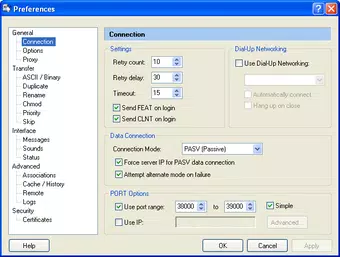
- Customizable Transfer Settings: Users can define rules for handling duplicate files, enable inline compression, schedule transfers, and limit transfer speeds to manage bandwidth usage effectively.
- Comprehensive Logging & Help: Built-in logging and access to online documentation assist users in troubleshooting issues and mastering advanced features, particularly beneficial for new users.
For example, a web developer can use LeapFTP to upload updated website files via SFTP while simultaneously monitoring a backup transfer via FTP+SSL. A remote worker might schedule nightly backups using the built-in scheduler, ensuring data integrity without manual intervention. The combination of protocol flexibility and automation tools makes LeapFTP a powerful utility for users managing complex file workflows on the go.
Interface, UX & Performance
LeapFTP features a clean, tabbed interface that closely resembles desktop file explorers, promoting intuitive navigation and reducing the learning curve for users familiar with traditional file management systems. The layout organizes servers, folders, and files in a hierarchical structure, allowing users to browse, copy, move, and delete files with minimal friction.
Navigation is straightforward, with clearly labeled tabs and contextual menus that respond quickly to user input. The app maintains responsiveness even when managing multiple active connections, although the developer did not list formal performance metrics. Stability appears consistent across device categories, as the app’s lightweight footprint of 15.5 MB suggests optimized resource usage.
Although the developer did not specify minimum OS requirements, the app functions well on a range of Android devices, including mid-tier and high-end models. The interface scales appropriately, and touch interactions are precise. Users can expect smooth transitions between servers and consistent performance during active transfers, even on older devices. The app’s performance is further enhanced by efficient background processing, allowing users to continue other tasks without interruption.
Platform Compatibility & Technical Requirements
LeapFTP is available exclusively on the Android platform. The current version is 3.1.2, with a file size of 15.5 MB, making it a lightweight application suitable for devices with limited storage capacity. The app is free to download and install, removing cost barriers for users seeking a secure file transfer solution.
The developer did not specify minimum OS requirements or compatibility details beyond the platform. As such, users should ensure their Android device supports the app’s required libraries, particularly for SSL and SSH functionality. The absence of detailed technical specifications does not detract from the app’s usability, but it may require users to test compatibility on older or less common Android versions.
Pros and Cons
Pros
- Supports multiple file transfer protocols including SFTP, FTP, and HTTP(S)
- Intuitive tabbed interface mimics desktop file explorer for easy navigation
- Strong security features including encryption and one-time password support
- Customizable transfer options such as scheduling, speed limiting, and duplicate handling
- Free to download and use with no in-app purchases or ads
Cons
- Developer did not provide detailed OS or device compatibility information
- Limited public documentation on update frequency or future development plans
- No official iOS version available for cross-platform users
- Advanced features may require some technical knowledge to configure optimally
- Interface lacks modern visual enhancements like dark mode or animated transitions
FAQ
Is LeapFTP safe to use on Android?
Yes, LeapFTP uses industry-standard SSL and SSH libraries for encryption, and it supports secure authentication methods like one-time passwords. The app also encrypts stored site credentials, ensuring data protection during transfers and storage.
Can I transfer files between two remote servers using LeapFTP?
Yes, LeapFTP supports FXP (File eXchange Protocol), which allows direct file transfers between two remote servers without involving the local device. This feature is useful for moving data across different hosting environments efficiently.
Does LeapFTP work on iOS devices?
Currently, LeapFTP is only available for Android. There is no official iOS version released by the developer.
How often does LeapFTP receive updates?
The developer did not disclose update frequency. However, the app has been maintained since 2010, suggesting ongoing support and occasional improvements.
Is LeapFTP free to use?
Yes, LeapFTP is completely free to download and install. There are no in-app purchases, subscriptions, or advertisements within the app.
Final Thoughts
LeapFTP stands out as a reliable, no-frills file transfer client that delivers strong functionality without compromising on security or usability. Its support for multiple protocols, tabbed interface, and customizable transfer settings make it a valuable tool for developers, IT professionals, and anyone managing files across remote servers. While it lacks modern UI flourishes and cross-platform availability, its core performance and feature set remain competitive in the productivity category.
For users who prioritize control, security, and protocol flexibility over flashy design, LeapFTP offers a solid value proposition. Its free pricing model further enhances its appeal, making it accessible to a broad audience.
Download LeapFTP now


